Compare commits
| Author | SHA1 | Date | |
|---|---|---|---|
 The Librarian The Librarian
|
6bfb23ec9f | ||
|
The Librarian
|
62c02724f3 | ||
|
The Librarian
|
d804be2b33 |
@@ -4,8 +4,8 @@ This is a mirror of the Ollama repository.
|
||||
|
||||
**Synced from:** https://github.com/ollama/ollama.git
|
||||
**Branch:** main
|
||||
**Commit:** c146a138e35520cd7ee132da46c6ae185778b4f0
|
||||
**Sync Date:** 2025-12-07
|
||||
**Commit:** f8dc7c9f54a753d2c6d3410936e73486f9bf463d
|
||||
**Sync Date:** 2026-02-12
|
||||
**Content:** Paths: docs
|
||||
|
||||
---
|
||||
|
||||
@@ -14,6 +14,7 @@
|
||||
* [API Reference](https://docs.ollama.com/api)
|
||||
* [Modelfile Reference](https://docs.ollama.com/modelfile)
|
||||
* [OpenAI Compatibility](https://docs.ollama.com/api/openai-compatibility)
|
||||
* [Anthropic Compatibility](./api/anthropic-compatibility.mdx)
|
||||
|
||||
### Resources
|
||||
|
||||
|
||||
@@ -16,6 +16,7 @@
|
||||
- [Generate Embeddings](#generate-embeddings)
|
||||
- [List Running Models](#list-running-models)
|
||||
- [Version](#version)
|
||||
- [Experimental: Image Generation](#image-generation-experimental)
|
||||
|
||||
## Conventions
|
||||
|
||||
@@ -50,7 +51,7 @@ Generate a response for a given prompt with a provided model. This is a streamin
|
||||
Advanced parameters (optional):
|
||||
|
||||
- `format`: the format to return a response in. Format can be `json` or a JSON schema
|
||||
- `options`: additional model parameters listed in the documentation for the [Modelfile](./modelfile.md#valid-parameters-and-values) such as `temperature`
|
||||
- `options`: additional model parameters listed in the documentation for the [Modelfile](./modelfile.mdx#valid-parameters-and-values) such as `temperature`
|
||||
- `system`: system message to (overrides what is defined in the `Modelfile`)
|
||||
- `template`: the prompt template to use (overrides what is defined in the `Modelfile`)
|
||||
- `stream`: if `false` the response will be returned as a single response object, rather than a stream of objects
|
||||
@@ -58,6 +59,15 @@ Advanced parameters (optional):
|
||||
- `keep_alive`: controls how long the model will stay loaded into memory following the request (default: `5m`)
|
||||
- `context` (deprecated): the context parameter returned from a previous request to `/generate`, this can be used to keep a short conversational memory
|
||||
|
||||
Experimental image generation parameters (for image generation models only):
|
||||
|
||||
> [!WARNING]
|
||||
> These parameters are experimental and may change in future versions.
|
||||
|
||||
- `width`: width of the generated image in pixels
|
||||
- `height`: height of the generated image in pixels
|
||||
- `steps`: number of diffusion steps
|
||||
|
||||
#### Structured outputs
|
||||
|
||||
Structured outputs are supported by providing a JSON schema in the `format` parameter. The model will generate a response that matches the schema. See the [structured outputs](#request-structured-outputs) example below.
|
||||
@@ -507,7 +517,7 @@ The `message` object has the following fields:
|
||||
Advanced parameters (optional):
|
||||
|
||||
- `format`: the format to return a response in. Format can be `json` or a JSON schema.
|
||||
- `options`: additional model parameters listed in the documentation for the [Modelfile](./modelfile.md#valid-parameters-and-values) such as `temperature`
|
||||
- `options`: additional model parameters listed in the documentation for the [Modelfile](./modelfile.mdx#valid-parameters-and-values) such as `temperature`
|
||||
- `stream`: if `false` the response will be returned as a single response object, rather than a stream of objects
|
||||
- `keep_alive`: controls how long the model will stay loaded into memory following the request (default: `5m`)
|
||||
|
||||
@@ -895,11 +905,11 @@ curl http://localhost:11434/api/chat -d '{
|
||||
"tool_calls": [
|
||||
{
|
||||
"function": {
|
||||
"name": "get_temperature",
|
||||
"name": "get_weather",
|
||||
"arguments": {
|
||||
"city": "Toronto"
|
||||
}
|
||||
},
|
||||
}
|
||||
}
|
||||
]
|
||||
},
|
||||
@@ -907,7 +917,7 @@ curl http://localhost:11434/api/chat -d '{
|
||||
{
|
||||
"role": "tool",
|
||||
"content": "11 degrees celsius",
|
||||
"tool_name": "get_temperature",
|
||||
"tool_name": "get_weather"
|
||||
}
|
||||
],
|
||||
"stream": false,
|
||||
@@ -1189,7 +1199,7 @@ If you are creating a model from a safetensors directory or from a GGUF file, yo
|
||||
- `template`: (optional) the prompt template for the model
|
||||
- `license`: (optional) a string or list of strings containing the license or licenses for the model
|
||||
- `system`: (optional) a string containing the system prompt for the model
|
||||
- `parameters`: (optional) a dictionary of parameters for the model (see [Modelfile](./modelfile.md#valid-parameters-and-values) for a list of parameters)
|
||||
- `parameters`: (optional) a dictionary of parameters for the model (see [Modelfile](./modelfile.mdx#valid-parameters-and-values) for a list of parameters)
|
||||
- `messages`: (optional) a list of message objects used to create a conversation
|
||||
- `stream`: (optional) if `false` the response will be returned as a single response object, rather than a stream of objects
|
||||
- `quantize` (optional): quantize a non-quantized (e.g. float16) model
|
||||
@@ -1698,7 +1708,7 @@ Generate embeddings from a model
|
||||
Advanced parameters:
|
||||
|
||||
- `truncate`: truncates the end of each input to fit within context length. Returns error if `false` and context length is exceeded. Defaults to `true`
|
||||
- `options`: additional model parameters listed in the documentation for the [Modelfile](./modelfile.md#valid-parameters-and-values) such as `temperature`
|
||||
- `options`: additional model parameters listed in the documentation for the [Modelfile](./modelfile.mdx#valid-parameters-and-values) such as `temperature`
|
||||
- `keep_alive`: controls how long the model will stay loaded into memory following the request (default: `5m`)
|
||||
- `dimensions`: number of dimensions for the embedding
|
||||
|
||||
@@ -1817,7 +1827,7 @@ Generate embeddings from a model
|
||||
|
||||
Advanced parameters:
|
||||
|
||||
- `options`: additional model parameters listed in the documentation for the [Modelfile](./modelfile.md#valid-parameters-and-values) such as `temperature`
|
||||
- `options`: additional model parameters listed in the documentation for the [Modelfile](./modelfile.mdx#valid-parameters-and-values) such as `temperature`
|
||||
- `keep_alive`: controls how long the model will stay loaded into memory following the request (default: `5m`)
|
||||
|
||||
### Examples
|
||||
@@ -1867,3 +1877,55 @@ curl http://localhost:11434/api/version
|
||||
"version": "0.5.1"
|
||||
}
|
||||
```
|
||||
|
||||
## Experimental Features
|
||||
|
||||
### Image Generation (Experimental)
|
||||
|
||||
> [!WARNING]
|
||||
> Image generation is experimental and may change in future versions.
|
||||
|
||||
Image generation is now supported through the standard `/api/generate` endpoint when using image generation models. The API automatically detects when an image generation model is being used.
|
||||
|
||||
See the [Generate a completion](#generate-a-completion) section for the full API documentation. The experimental image generation parameters (`width`, `height`, `steps`) are documented there.
|
||||
|
||||
#### Example
|
||||
|
||||
##### Request
|
||||
|
||||
```shell
|
||||
curl http://localhost:11434/api/generate -d '{
|
||||
"model": "x/z-image-turbo",
|
||||
"prompt": "a sunset over mountains",
|
||||
"width": 1024,
|
||||
"height": 768
|
||||
}'
|
||||
```
|
||||
|
||||
##### Response (streaming)
|
||||
|
||||
Progress updates during generation:
|
||||
|
||||
```json
|
||||
{
|
||||
"model": "x/z-image-turbo",
|
||||
"created_at": "2024-01-15T10:30:00.000000Z",
|
||||
"completed": 5,
|
||||
"total": 20,
|
||||
"done": false
|
||||
}
|
||||
```
|
||||
|
||||
##### Final Response
|
||||
|
||||
```json
|
||||
{
|
||||
"model": "x/z-image-turbo",
|
||||
"created_at": "2024-01-15T10:30:15.000000Z",
|
||||
"image": "iVBORw0KGgoAAAANSUhEUg...",
|
||||
"done": true,
|
||||
"done_reason": "stop",
|
||||
"total_duration": 15000000000,
|
||||
"load_duration": 2000000000
|
||||
}
|
||||
```
|
||||
|
||||
@@ -0,0 +1,423 @@
|
||||
---
|
||||
title: Anthropic compatibility
|
||||
---
|
||||
|
||||
Ollama provides compatibility with the [Anthropic Messages API](https://docs.anthropic.com/en/api/messages) to help connect existing applications to Ollama, including tools like Claude Code.
|
||||
|
||||
## Usage
|
||||
|
||||
### Environment variables
|
||||
|
||||
To use Ollama with tools that expect the Anthropic API (like Claude Code), set these environment variables:
|
||||
|
||||
```shell
|
||||
export ANTHROPIC_AUTH_TOKEN=ollama # required but ignored
|
||||
export ANTHROPIC_API_KEY="" # required but ignored
|
||||
export ANTHROPIC_BASE_URL=http://localhost:11434
|
||||
```
|
||||
|
||||
### Simple `/v1/messages` example
|
||||
|
||||
<CodeGroup dropdown>
|
||||
|
||||
```python basic.py
|
||||
import anthropic
|
||||
|
||||
client = anthropic.Anthropic(
|
||||
base_url='http://localhost:11434',
|
||||
api_key='ollama', # required but ignored
|
||||
)
|
||||
|
||||
message = client.messages.create(
|
||||
model='qwen3-coder',
|
||||
max_tokens=1024,
|
||||
messages=[
|
||||
{'role': 'user', 'content': 'Hello, how are you?'}
|
||||
]
|
||||
)
|
||||
print(message.content[0].text)
|
||||
```
|
||||
|
||||
```javascript basic.js
|
||||
import Anthropic from "@anthropic-ai/sdk";
|
||||
|
||||
const anthropic = new Anthropic({
|
||||
baseURL: "http://localhost:11434",
|
||||
apiKey: "ollama", // required but ignored
|
||||
});
|
||||
|
||||
const message = await anthropic.messages.create({
|
||||
model: "qwen3-coder",
|
||||
max_tokens: 1024,
|
||||
messages: [{ role: "user", content: "Hello, how are you?" }],
|
||||
});
|
||||
|
||||
console.log(message.content[0].text);
|
||||
```
|
||||
|
||||
```shell basic.sh
|
||||
curl -X POST http://localhost:11434/v1/messages \
|
||||
-H "Content-Type: application/json" \
|
||||
-H "x-api-key: ollama" \
|
||||
-H "anthropic-version: 2023-06-01" \
|
||||
-d '{
|
||||
"model": "qwen3-coder",
|
||||
"max_tokens": 1024,
|
||||
"messages": [{ "role": "user", "content": "Hello, how are you?" }]
|
||||
}'
|
||||
```
|
||||
|
||||
</CodeGroup>
|
||||
|
||||
### Streaming example
|
||||
|
||||
<CodeGroup dropdown>
|
||||
|
||||
```python streaming.py
|
||||
import anthropic
|
||||
|
||||
client = anthropic.Anthropic(
|
||||
base_url='http://localhost:11434',
|
||||
api_key='ollama',
|
||||
)
|
||||
|
||||
with client.messages.stream(
|
||||
model='qwen3-coder',
|
||||
max_tokens=1024,
|
||||
messages=[{'role': 'user', 'content': 'Count from 1 to 10'}]
|
||||
) as stream:
|
||||
for text in stream.text_stream:
|
||||
print(text, end='', flush=True)
|
||||
```
|
||||
|
||||
```javascript streaming.js
|
||||
import Anthropic from "@anthropic-ai/sdk";
|
||||
|
||||
const anthropic = new Anthropic({
|
||||
baseURL: "http://localhost:11434",
|
||||
apiKey: "ollama",
|
||||
});
|
||||
|
||||
const stream = await anthropic.messages.stream({
|
||||
model: "qwen3-coder",
|
||||
max_tokens: 1024,
|
||||
messages: [{ role: "user", content: "Count from 1 to 10" }],
|
||||
});
|
||||
|
||||
for await (const event of stream) {
|
||||
if (
|
||||
event.type === "content_block_delta" &&
|
||||
event.delta.type === "text_delta"
|
||||
) {
|
||||
process.stdout.write(event.delta.text);
|
||||
}
|
||||
}
|
||||
```
|
||||
|
||||
```shell streaming.sh
|
||||
curl -X POST http://localhost:11434/v1/messages \
|
||||
-H "Content-Type: application/json" \
|
||||
-d '{
|
||||
"model": "qwen3-coder",
|
||||
"max_tokens": 1024,
|
||||
"stream": true,
|
||||
"messages": [{ "role": "user", "content": "Count from 1 to 10" }]
|
||||
}'
|
||||
```
|
||||
|
||||
</CodeGroup>
|
||||
|
||||
### Tool calling example
|
||||
|
||||
<CodeGroup dropdown>
|
||||
|
||||
```python tools.py
|
||||
import anthropic
|
||||
|
||||
client = anthropic.Anthropic(
|
||||
base_url='http://localhost:11434',
|
||||
api_key='ollama',
|
||||
)
|
||||
|
||||
message = client.messages.create(
|
||||
model='qwen3-coder',
|
||||
max_tokens=1024,
|
||||
tools=[
|
||||
{
|
||||
'name': 'get_weather',
|
||||
'description': 'Get the current weather in a location',
|
||||
'input_schema': {
|
||||
'type': 'object',
|
||||
'properties': {
|
||||
'location': {
|
||||
'type': 'string',
|
||||
'description': 'The city and state, e.g. San Francisco, CA'
|
||||
}
|
||||
},
|
||||
'required': ['location']
|
||||
}
|
||||
}
|
||||
],
|
||||
messages=[{'role': 'user', 'content': "What's the weather in San Francisco?"}]
|
||||
)
|
||||
|
||||
for block in message.content:
|
||||
if block.type == 'tool_use':
|
||||
print(f'Tool: {block.name}')
|
||||
print(f'Input: {block.input}')
|
||||
```
|
||||
|
||||
```javascript tools.js
|
||||
import Anthropic from "@anthropic-ai/sdk";
|
||||
|
||||
const anthropic = new Anthropic({
|
||||
baseURL: "http://localhost:11434",
|
||||
apiKey: "ollama",
|
||||
});
|
||||
|
||||
const message = await anthropic.messages.create({
|
||||
model: "qwen3-coder",
|
||||
max_tokens: 1024,
|
||||
tools: [
|
||||
{
|
||||
name: "get_weather",
|
||||
description: "Get the current weather in a location",
|
||||
input_schema: {
|
||||
type: "object",
|
||||
properties: {
|
||||
location: {
|
||||
type: "string",
|
||||
description: "The city and state, e.g. San Francisco, CA",
|
||||
},
|
||||
},
|
||||
required: ["location"],
|
||||
},
|
||||
},
|
||||
],
|
||||
messages: [{ role: "user", content: "What's the weather in San Francisco?" }],
|
||||
});
|
||||
|
||||
for (const block of message.content) {
|
||||
if (block.type === "tool_use") {
|
||||
console.log("Tool:", block.name);
|
||||
console.log("Input:", block.input);
|
||||
}
|
||||
}
|
||||
```
|
||||
|
||||
```shell tools.sh
|
||||
curl -X POST http://localhost:11434/v1/messages \
|
||||
-H "Content-Type: application/json" \
|
||||
-d '{
|
||||
"model": "qwen3-coder",
|
||||
"max_tokens": 1024,
|
||||
"tools": [
|
||||
{
|
||||
"name": "get_weather",
|
||||
"description": "Get the current weather in a location",
|
||||
"input_schema": {
|
||||
"type": "object",
|
||||
"properties": {
|
||||
"location": {
|
||||
"type": "string",
|
||||
"description": "The city and state"
|
||||
}
|
||||
},
|
||||
"required": ["location"]
|
||||
}
|
||||
}
|
||||
],
|
||||
"messages": [{ "role": "user", "content": "What is the weather in San Francisco?" }]
|
||||
}'
|
||||
```
|
||||
|
||||
</CodeGroup>
|
||||
|
||||
## Using with Claude Code
|
||||
|
||||
[Claude Code](https://code.claude.com/docs/en/overview) can be configured to use Ollama as its backend.
|
||||
|
||||
### Recommended models
|
||||
|
||||
For coding use cases, models like `glm-4.7`, `minimax-m2.1`, and `qwen3-coder` are recommended.
|
||||
|
||||
Download a model before use:
|
||||
|
||||
```shell
|
||||
ollama pull qwen3-coder
|
||||
```
|
||||
> Note: Qwen 3 coder is a 30B parameter model requiring at least 24GB of VRAM to run smoothly. More is required for longer context lengths.
|
||||
|
||||
```shell
|
||||
ollama pull glm-4.7:cloud
|
||||
```
|
||||
|
||||
### Quick setup
|
||||
|
||||
```shell
|
||||
ollama launch claude
|
||||
```
|
||||
|
||||
This will prompt you to select a model, configure Claude Code automatically, and launch it. To configure without launching:
|
||||
|
||||
```shell
|
||||
ollama launch claude --config
|
||||
```
|
||||
|
||||
### Manual setup
|
||||
|
||||
Set the environment variables and run Claude Code:
|
||||
|
||||
```shell
|
||||
ANTHROPIC_AUTH_TOKEN=ollama ANTHROPIC_BASE_URL=http://localhost:11434 ANTHROPIC_API_KEY="" claude --model qwen3-coder
|
||||
```
|
||||
|
||||
Or set the environment variables in your shell profile:
|
||||
|
||||
```shell
|
||||
export ANTHROPIC_AUTH_TOKEN=ollama
|
||||
export ANTHROPIC_BASE_URL=http://localhost:11434
|
||||
export ANTHROPIC_API_KEY=""
|
||||
```
|
||||
|
||||
Then run Claude Code with any Ollama model:
|
||||
|
||||
```shell
|
||||
claude --model qwen3-coder
|
||||
```
|
||||
|
||||
## Endpoints
|
||||
|
||||
### `/v1/messages`
|
||||
|
||||
#### Supported features
|
||||
|
||||
- [x] Messages
|
||||
- [x] Streaming
|
||||
- [x] System prompts
|
||||
- [x] Multi-turn conversations
|
||||
- [x] Vision (images)
|
||||
- [x] Tools (function calling)
|
||||
- [x] Tool results
|
||||
- [x] Thinking/extended thinking
|
||||
|
||||
#### Supported request fields
|
||||
|
||||
- [x] `model`
|
||||
- [x] `max_tokens`
|
||||
- [x] `messages`
|
||||
- [x] Text `content`
|
||||
- [x] Image `content` (base64)
|
||||
- [x] Array of content blocks
|
||||
- [x] `tool_use` blocks
|
||||
- [x] `tool_result` blocks
|
||||
- [x] `thinking` blocks
|
||||
- [x] `system` (string or array)
|
||||
- [x] `stream`
|
||||
- [x] `temperature`
|
||||
- [x] `top_p`
|
||||
- [x] `top_k`
|
||||
- [x] `stop_sequences`
|
||||
- [x] `tools`
|
||||
- [x] `thinking`
|
||||
- [ ] `tool_choice`
|
||||
- [ ] `metadata`
|
||||
|
||||
#### Supported response fields
|
||||
|
||||
- [x] `id`
|
||||
- [x] `type`
|
||||
- [x] `role`
|
||||
- [x] `model`
|
||||
- [x] `content` (text, tool_use, thinking blocks)
|
||||
- [x] `stop_reason` (end_turn, max_tokens, tool_use)
|
||||
- [x] `usage` (input_tokens, output_tokens)
|
||||
|
||||
#### Streaming events
|
||||
|
||||
- [x] `message_start`
|
||||
- [x] `content_block_start`
|
||||
- [x] `content_block_delta` (text_delta, input_json_delta, thinking_delta)
|
||||
- [x] `content_block_stop`
|
||||
- [x] `message_delta`
|
||||
- [x] `message_stop`
|
||||
- [x] `ping`
|
||||
- [x] `error`
|
||||
|
||||
## Models
|
||||
|
||||
Ollama supports both local and cloud models.
|
||||
|
||||
### Local models
|
||||
|
||||
Pull a local model before use:
|
||||
|
||||
```shell
|
||||
ollama pull qwen3-coder
|
||||
```
|
||||
|
||||
Recommended local models:
|
||||
- `qwen3-coder` - Excellent for coding tasks
|
||||
- `gpt-oss:20b` - Strong general-purpose model
|
||||
|
||||
### Cloud models
|
||||
|
||||
Cloud models are available immediately without pulling:
|
||||
|
||||
- `glm-4.7:cloud` - High-performance cloud model
|
||||
- `minimax-m2.1:cloud` - Fast cloud model
|
||||
|
||||
### Default model names
|
||||
|
||||
For tooling that relies on default Anthropic model names such as `claude-3-5-sonnet`, use `ollama cp` to copy an existing model name:
|
||||
|
||||
```shell
|
||||
ollama cp qwen3-coder claude-3-5-sonnet
|
||||
```
|
||||
|
||||
Afterwards, this new model name can be specified in the `model` field:
|
||||
|
||||
```shell
|
||||
curl http://localhost:11434/v1/messages \
|
||||
-H "Content-Type: application/json" \
|
||||
-d '{
|
||||
"model": "claude-3-5-sonnet",
|
||||
"max_tokens": 1024,
|
||||
"messages": [
|
||||
{
|
||||
"role": "user",
|
||||
"content": "Hello!"
|
||||
}
|
||||
]
|
||||
}'
|
||||
```
|
||||
|
||||
## Differences from the Anthropic API
|
||||
|
||||
### Behavior differences
|
||||
|
||||
- API key is accepted but not validated
|
||||
- `anthropic-version` header is accepted but not used
|
||||
- Token counts are approximations based on the underlying model's tokenizer
|
||||
|
||||
### Not supported
|
||||
|
||||
The following Anthropic API features are not currently supported:
|
||||
|
||||
| Feature | Description |
|
||||
|---------|-------------|
|
||||
| `/v1/messages/count_tokens` | Token counting endpoint |
|
||||
| `tool_choice` | Forcing specific tool use or disabling tools |
|
||||
| `metadata` | Request metadata (user_id) |
|
||||
| Prompt caching | `cache_control` blocks for caching prefixes |
|
||||
| Batches API | `/v1/messages/batches` for async batch processing |
|
||||
| Citations | `citations` content blocks |
|
||||
| PDF support | `document` content blocks with PDF files |
|
||||
| Server-sent errors | `error` events during streaming (errors return HTTP status) |
|
||||
|
||||
### Partial support
|
||||
|
||||
| Feature | Status |
|
||||
|---------|--------|
|
||||
| Image content | Base64 images supported; URL images not supported |
|
||||
| Extended thinking | Basic support; `budget_tokens` accepted but not enforced |
|
||||
@@ -36,7 +36,6 @@ Provide an `images` array. SDKs accept file paths, URLs or raw bytes while the R
|
||||
}],
|
||||
"stream": false
|
||||
}'
|
||||
"
|
||||
```
|
||||
</Tab>
|
||||
<Tab title="Python">
|
||||
|
||||
@@ -110,7 +110,7 @@ More Ollama [Python example](https://github.com/ollama/ollama-python/blob/main/e
|
||||
import { Ollama } from "ollama";
|
||||
|
||||
const client = new Ollama();
|
||||
const results = await client.webSearch({ query: "what is ollama?" });
|
||||
const results = await client.webSearch("what is ollama?");
|
||||
console.log(JSON.stringify(results, null, 2));
|
||||
```
|
||||
|
||||
@@ -213,7 +213,7 @@ models](https://ollama.com/models)\n\nAvailable for macOS, Windows, and Linux',
|
||||
import { Ollama } from "ollama";
|
||||
|
||||
const client = new Ollama();
|
||||
const fetchResult = await client.webFetch({ url: "https://ollama.com" });
|
||||
const fetchResult = await client.webFetch("https://ollama.com");
|
||||
console.log(JSON.stringify(fetchResult, null, 2));
|
||||
```
|
||||
|
||||
|
||||
@@ -8,6 +8,47 @@ title: CLI Reference
|
||||
ollama run gemma3
|
||||
```
|
||||
|
||||
### Launch integrations
|
||||
|
||||
```
|
||||
ollama launch
|
||||
```
|
||||
|
||||
Configure and launch external applications to use Ollama models. This provides an interactive way to set up and start integrations with supported apps.
|
||||
|
||||
#### Supported integrations
|
||||
|
||||
- **OpenCode** - Open-source coding assistant
|
||||
- **Claude Code** - Anthropic's agentic coding tool
|
||||
- **Codex** - OpenAI's coding assistant
|
||||
- **Droid** - Factory's AI coding agent
|
||||
|
||||
#### Examples
|
||||
|
||||
Launch an integration interactively:
|
||||
|
||||
```
|
||||
ollama launch
|
||||
```
|
||||
|
||||
Launch a specific integration:
|
||||
|
||||
```
|
||||
ollama launch claude
|
||||
```
|
||||
|
||||
Launch with a specific model:
|
||||
|
||||
```
|
||||
ollama launch claude --model qwen3-coder
|
||||
```
|
||||
|
||||
Configure without launching:
|
||||
|
||||
```
|
||||
ollama launch droid --config
|
||||
```
|
||||
|
||||
#### Multiline input
|
||||
|
||||
For multiline input, you can wrap text with `"""`:
|
||||
|
||||
@@ -3,8 +3,6 @@ title: Cloud
|
||||
sidebarTitle: Cloud
|
||||
---
|
||||
|
||||
<Info>Ollama's cloud is currently in preview.</Info>
|
||||
|
||||
## Cloud Models
|
||||
|
||||
Ollama's cloud models are a new kind of model in Ollama that can run without a powerful GPU. Instead, cloud models are automatically offloaded to Ollama's cloud service while offering the same capabilities as local models, making it possible to keep using your local tools while running larger models that wouldn't fit on a personal computer.
|
||||
|
||||
@@ -5,10 +5,13 @@ title: Context length
|
||||
Context length is the maximum number of tokens that the model has access to in memory.
|
||||
|
||||
<Note>
|
||||
The default context length in Ollama is 4096 tokens.
|
||||
Ollama defaults to the following context lengths based on VRAM:
|
||||
- < 24 GiB VRAM: 4k context
|
||||
- 24-48 GiB VRAM: 32k context
|
||||
- >= 48 GiB VRAM: 256k context
|
||||
</Note>
|
||||
|
||||
Tasks which require large context like web search, agents, and coding tools should be set to at least 32000 tokens.
|
||||
Tasks which require large context like web search, agents, and coding tools should be set to at least 64000 tokens.
|
||||
|
||||
## Setting context length
|
||||
|
||||
@@ -24,7 +27,7 @@ Change the slider in the Ollama app under settings to your desired context lengt
|
||||
### CLI
|
||||
If editing the context length for Ollama is not possible, the context length can also be updated when serving Ollama.
|
||||
```
|
||||
OLLAMA_CONTEXT_LENGTH=32000 ollama serve
|
||||
OLLAMA_CONTEXT_LENGTH=64000 ollama serve
|
||||
```
|
||||
|
||||
### Check allocated context length and model offloading
|
||||
|
||||
@@ -32,7 +32,9 @@
|
||||
"codeblocks": "system"
|
||||
},
|
||||
"contextual": {
|
||||
"options": ["copy"]
|
||||
"options": [
|
||||
"copy"
|
||||
]
|
||||
},
|
||||
"navbar": {
|
||||
"links": [
|
||||
@@ -52,7 +54,9 @@
|
||||
"display": "simple"
|
||||
},
|
||||
"examples": {
|
||||
"languages": ["curl"]
|
||||
"languages": [
|
||||
"curl"
|
||||
]
|
||||
}
|
||||
},
|
||||
"redirects": [
|
||||
@@ -67,6 +71,10 @@
|
||||
{
|
||||
"source": "/api",
|
||||
"destination": "/api/introduction"
|
||||
},
|
||||
{
|
||||
"source": "/integrations/clawdbot",
|
||||
"destination": "/integrations/openclaw"
|
||||
}
|
||||
],
|
||||
"navigation": {
|
||||
@@ -97,16 +105,52 @@
|
||||
{
|
||||
"group": "Integrations",
|
||||
"pages": [
|
||||
"/integrations/vscode",
|
||||
"/integrations/jetbrains",
|
||||
"/integrations/codex",
|
||||
"/integrations/cline",
|
||||
"/integrations/droid",
|
||||
"/integrations/goose",
|
||||
"/integrations/zed",
|
||||
"/integrations/roo-code",
|
||||
"/integrations/n8n",
|
||||
"/integrations/xcode"
|
||||
"/integrations/index",
|
||||
{
|
||||
"group": "Coding",
|
||||
"pages": [
|
||||
"/integrations/claude-code",
|
||||
"/integrations/codex",
|
||||
"/integrations/opencode",
|
||||
"/integrations/droid",
|
||||
"/integrations/goose"
|
||||
]
|
||||
},
|
||||
{
|
||||
"group": "Assistants",
|
||||
"pages": [
|
||||
"/integrations/openclaw"
|
||||
]
|
||||
},
|
||||
{
|
||||
"group": "IDEs & Editors",
|
||||
"pages": [
|
||||
"/integrations/cline",
|
||||
"/integrations/jetbrains",
|
||||
"/integrations/roo-code",
|
||||
"/integrations/vscode",
|
||||
"/integrations/xcode",
|
||||
"/integrations/zed"
|
||||
]
|
||||
},
|
||||
{
|
||||
"group": "Chat & RAG",
|
||||
"pages": [
|
||||
"/integrations/onyx"
|
||||
]
|
||||
},
|
||||
{
|
||||
"group": "Automation",
|
||||
"pages": [
|
||||
"/integrations/n8n"
|
||||
]
|
||||
},
|
||||
{
|
||||
"group": "Notebooks",
|
||||
"pages": [
|
||||
"/integrations/marimo"
|
||||
]
|
||||
}
|
||||
]
|
||||
},
|
||||
{
|
||||
@@ -139,7 +183,8 @@
|
||||
"/api/streaming",
|
||||
"/api/usage",
|
||||
"/api/errors",
|
||||
"/api/openai-compatibility"
|
||||
"/api/openai-compatibility",
|
||||
"/api/anthropic-compatibility"
|
||||
]
|
||||
},
|
||||
{
|
||||
|
||||
@@ -14,15 +14,15 @@ curl -fsSL https://ollama.com/install.sh | sh
|
||||
|
||||
## How can I view the logs?
|
||||
|
||||
Review the [Troubleshooting](./troubleshooting.md) docs for more about using logs.
|
||||
Review the [Troubleshooting](./troubleshooting.mdx) docs for more about using logs.
|
||||
|
||||
## Is my GPU compatible with Ollama?
|
||||
|
||||
Please refer to the [GPU docs](./gpu.md).
|
||||
Please refer to the [GPU docs](./gpu.mdx).
|
||||
|
||||
## How can I specify the context window size?
|
||||
|
||||
By default, Ollama uses a context window size of 2048 tokens.
|
||||
By default, Ollama uses a context window size of 4096 tokens.
|
||||
|
||||
This can be overridden with the `OLLAMA_CONTEXT_LENGTH` environment variable. For example, to set the default context window to 8K, use:
|
||||
|
||||
@@ -66,7 +66,7 @@ llama3:70b bcfb190ca3a7 42 GB 100% GPU 4 minutes from now
|
||||
```
|
||||
</Info>
|
||||
|
||||
The `Processor` column will show which memory the model was loaded in to:
|
||||
The `Processor` column will show which memory the model was loaded into:
|
||||
|
||||
- `100% GPU` means the model was loaded entirely into the GPU
|
||||
- `100% CPU` means the model was loaded entirely in system memory
|
||||
@@ -158,7 +158,7 @@ docker run -d -e HTTPS_PROXY=https://my.proxy.example.com -p 11434:11434 ollama-
|
||||
|
||||
## Does Ollama send my prompts and answers back to ollama.com?
|
||||
|
||||
No. Ollama runs locally, and conversation data does not leave your machine.
|
||||
Ollama runs locally. We don't see your prompts or data when you run locally. When using cloud-hosted models, we process your prompts and responses to provide the service but do not store or log that content and never train on it. We collect basic account info and limited usage metadata to provide the service that does not include prompt or response content. We don't sell your data. You can delete your account anytime.
|
||||
|
||||
## How can I expose Ollama on my network?
|
||||
|
||||
@@ -183,7 +183,7 @@ server {
|
||||
|
||||
## How can I use Ollama with ngrok?
|
||||
|
||||
Ollama can be accessed using a range of tools for tunneling tools. For example with Ngrok:
|
||||
Ollama can be accessed using a range of tunneling apps. For example with Ngrok:
|
||||
|
||||
```shell
|
||||
ngrok http 11434 --host-header="localhost:11434"
|
||||
@@ -240,7 +240,7 @@ GPU acceleration is not available for Docker Desktop in macOS due to the lack of
|
||||
|
||||
This can impact both installing Ollama, as well as downloading models.
|
||||
|
||||
Open `Control Panel > Networking and Internet > View network status and tasks` and click on `Change adapter settings` on the left panel. Find the `vEthernel (WSL)` adapter, right click and select `Properties`.
|
||||
Open `Control Panel > Networking and Internet > View network status and tasks` and click on `Change adapter settings` on the left panel. Find the `vEthernet (WSL)` adapter, right click and select `Properties`.
|
||||
Click on `Configure` and open the `Advanced` tab. Search through each of the properties until you find `Large Send Offload Version 2 (IPv4)` and `Large Send Offload Version 2 (IPv6)`. _Disable_ both of these
|
||||
properties.
|
||||
|
||||
@@ -299,7 +299,7 @@ The `keep_alive` API parameter with the `/api/generate` and `/api/chat` API endp
|
||||
|
||||
## How do I manage the maximum number of requests the Ollama server can queue?
|
||||
|
||||
If too many requests are sent to the server, it will respond with a 503 error indicating the server is overloaded. You can adjust how many requests may be queue by setting `OLLAMA_MAX_QUEUE`.
|
||||
If too many requests are sent to the server, it will respond with a 503 error indicating the server is overloaded. You can adjust how many requests may be queued by setting `OLLAMA_MAX_QUEUE`.
|
||||
|
||||
## How does Ollama handle concurrent requests?
|
||||
|
||||
@@ -312,10 +312,10 @@ Parallel request processing for a given model results in increasing the context
|
||||
The following server settings may be used to adjust how Ollama handles concurrent requests on most platforms:
|
||||
|
||||
- `OLLAMA_MAX_LOADED_MODELS` - The maximum number of models that can be loaded concurrently provided they fit in available memory. The default is 3 \* the number of GPUs or 3 for CPU inference.
|
||||
- `OLLAMA_NUM_PARALLEL` - The maximum number of parallel requests each model will process at the same time. The default will auto-select either 4 or 1 based on available memory.
|
||||
- `OLLAMA_NUM_PARALLEL` - The maximum number of parallel requests each model will process at the same time, default 1. Required RAM will scale by `OLLAMA_NUM_PARALLEL` * `OLLAMA_CONTEXT_LENGTH`.
|
||||
- `OLLAMA_MAX_QUEUE` - The maximum number of requests Ollama will queue when busy before rejecting additional requests. The default is 512
|
||||
|
||||
Note: Windows with Radeon GPUs currently default to 1 model maximum due to limitations in ROCm v5.7 for available VRAM reporting. Once ROCm v6.2 is available, Windows Radeon will follow the defaults above. You may enable concurrent model loads on Radeon on Windows, but ensure you don't load more models than will fit into your GPUs VRAM.
|
||||
Note: Windows with Radeon GPUs currently default to 1 model maximum due to limitations in ROCm v5.7 for available VRAM reporting. Once ROCm v6.2 is available, Windows Radeon will follow the defaults above. You may enable concurrent model loads on Radeon on Windows, but ensure you don't load more models than will fit into your GPU's VRAM.
|
||||
|
||||
## How does Ollama load models on multiple GPUs?
|
||||
|
||||
@@ -382,7 +382,7 @@ ollama signin
|
||||
Replace <username> with your actual Windows user name.
|
||||
</Note>
|
||||
|
||||
## How can I stop Ollama from starting when I login to my computer
|
||||
## How can I stop Ollama from starting when I login to my computer?
|
||||
|
||||
Ollama for Windows and macOS register as a login item during installation. You can disable this if you prefer not to have Ollama automatically start. Ollama will respect this setting across upgrades, unless you uninstall the application.
|
||||
|
||||
@@ -390,4 +390,4 @@ Ollama for Windows and macOS register as a login item during installation. You
|
||||
- In `Task Manager` go to the `Startup apps` tab, search for `ollama` then click `Disable`
|
||||
|
||||
**MacOS**
|
||||
- Open `Settings` and search for "Login Items", find the `Ollama` entry under "Allow in the Background`, then click the slider to disable.
|
||||
- Open `Settings` and search for "Login Items", find the `Ollama` entry under `Allow in the Background`, then click the slider to disable.
|
||||
|
||||
@@ -10,6 +10,7 @@ Check your compute compatibility to see if your card is supported:
|
||||
|
||||
| Compute Capability | Family | Cards |
|
||||
| ------------------ | ------------------- | ------------------------------------------------------------------------------------------------------------------------------ |
|
||||
| 12.1 | NVIDIA | `GB10 (DGX Spark)` |
|
||||
| 12.0 | GeForce RTX 50xx | `RTX 5060` `RTX 5060 Ti` `RTX 5070` `RTX 5070 Ti` `RTX 5080` `RTX 5090` |
|
||||
| | NVIDIA Professional | `RTX PRO 4000 Blackwell` `RTX PRO 4500 Blackwell` `RTX PRO 5000 Blackwell` `RTX PRO 6000 Blackwell` |
|
||||
| 9.0 | NVIDIA | `H200` `H100` |
|
||||
@@ -33,7 +34,7 @@ Check your compute compatibility to see if your card is supported:
|
||||
| 5.0 | GeForce GTX | `GTX 750 Ti` `GTX 750` `NVS 810` |
|
||||
| | Quadro | `K2200` `K1200` `K620` `M1200` `M520` `M5000M` `M4000M` `M3000M` `M2000M` `M1000M` `K620M` `M600M` `M500M` |
|
||||
|
||||
For building locally to support older GPUs, see [developer.md](./development.md#linux-cuda-nvidia)
|
||||
For building locally to support older GPUs, see [developer](./development#linux-cuda-nvidia)
|
||||
|
||||
### GPU Selection
|
||||
|
||||
@@ -54,7 +55,7 @@ sudo modprobe nvidia_uvm`
|
||||
|
||||
Ollama supports the following AMD GPUs via the ROCm library:
|
||||
|
||||
> [!NOTE]
|
||||
> **NOTE:**
|
||||
> Additional AMD GPU support is provided by the Vulkan Library - see below.
|
||||
|
||||
|
||||
@@ -132,9 +133,9 @@ Ollama supports GPU acceleration on Apple devices via the Metal API.
|
||||
|
||||
## Vulkan GPU Support
|
||||
|
||||
> [!NOTE]
|
||||
> **NOTE:**
|
||||
> Vulkan is currently an Experimental feature. To enable, you must set OLLAMA_VULKAN=1 for the Ollama server as
|
||||
described in the [FAQ](faq.md#how-do-i-configure-ollama-server)
|
||||
described in the [FAQ](faq#how-do-i-configure-ollama-server)
|
||||
|
||||
Additional GPU support on Windows and Linux is provided via
|
||||
[Vulkan](https://www.vulkan.org/). On Windows most GPU vendors drivers come
|
||||
@@ -161,6 +162,6 @@ sudo setcap cap_perfmon+ep /usr/local/bin/ollama
|
||||
|
||||
To select specific Vulkan GPU(s), you can set the environment variable
|
||||
`GGML_VK_VISIBLE_DEVICES` to one or more numeric IDs on the Ollama server as
|
||||
described in the [FAQ](faq.md#how-do-i-configure-ollama-server). If you
|
||||
described in the [FAQ](faq#how-do-i-configure-ollama-server). If you
|
||||
encounter any problems with Vulkan based GPUs, you can disable all Vulkan GPUs
|
||||
by setting `GGML_VK_VISIBLE_DEVICES=-1`
|
||||
by setting `GGML_VK_VISIBLE_DEVICES=-1`
|
||||
|
||||

|
After Width: | Height: | Size: 174 KiB |

|
After Width: | Height: | Size: 80 KiB |

|
After Width: | Height: | Size: 230 KiB |

|
After Width: | Height: | Size: 178 KiB |

|
After Width: | Height: | Size: 186 KiB |

|
After Width: | Height: | Size: 100 KiB |

|
After Width: | Height: | Size: 306 KiB |

|
After Width: | Height: | Size: 300 KiB |

|
After Width: | Height: | Size: 211 KiB |
@@ -134,22 +134,12 @@ success
|
||||
|
||||
### Supported Quantizations
|
||||
|
||||
- `q4_0`
|
||||
- `q4_1`
|
||||
- `q5_0`
|
||||
- `q5_1`
|
||||
- `q8_0`
|
||||
|
||||
#### K-means Quantizations
|
||||
|
||||
- `q3_K_S`
|
||||
- `q3_K_M`
|
||||
- `q3_K_L`
|
||||
- `q4_K_S`
|
||||
- `q4_K_M`
|
||||
- `q5_K_S`
|
||||
- `q5_K_M`
|
||||
- `q6_K`
|
||||
|
||||
## Sharing your model on ollama.com
|
||||
|
||||
|
||||
@@ -9,7 +9,7 @@ sidebarTitle: Welcome
|
||||
|
||||
<CardGroup cols={2}>
|
||||
<Card title="Quickstart" icon="rocket" href="/quickstart">
|
||||
Get up and running with your first model
|
||||
Get up and running with your first model or integrate Ollama with your favorite tools
|
||||
</Card>
|
||||
<Card
|
||||
title="Download Ollama"
|
||||
|
||||
@@ -0,0 +1,75 @@
|
||||
---
|
||||
title: Claude Code
|
||||
---
|
||||
|
||||
Claude Code is Anthropic's agentic coding tool that can read, modify, and execute code in your working directory.
|
||||
|
||||
Open models can be used with Claude Code through Ollama's Anthropic-compatible API, enabling you to use models such as `glm-4.7`, `qwen3-coder`, `gpt-oss`.
|
||||
|
||||
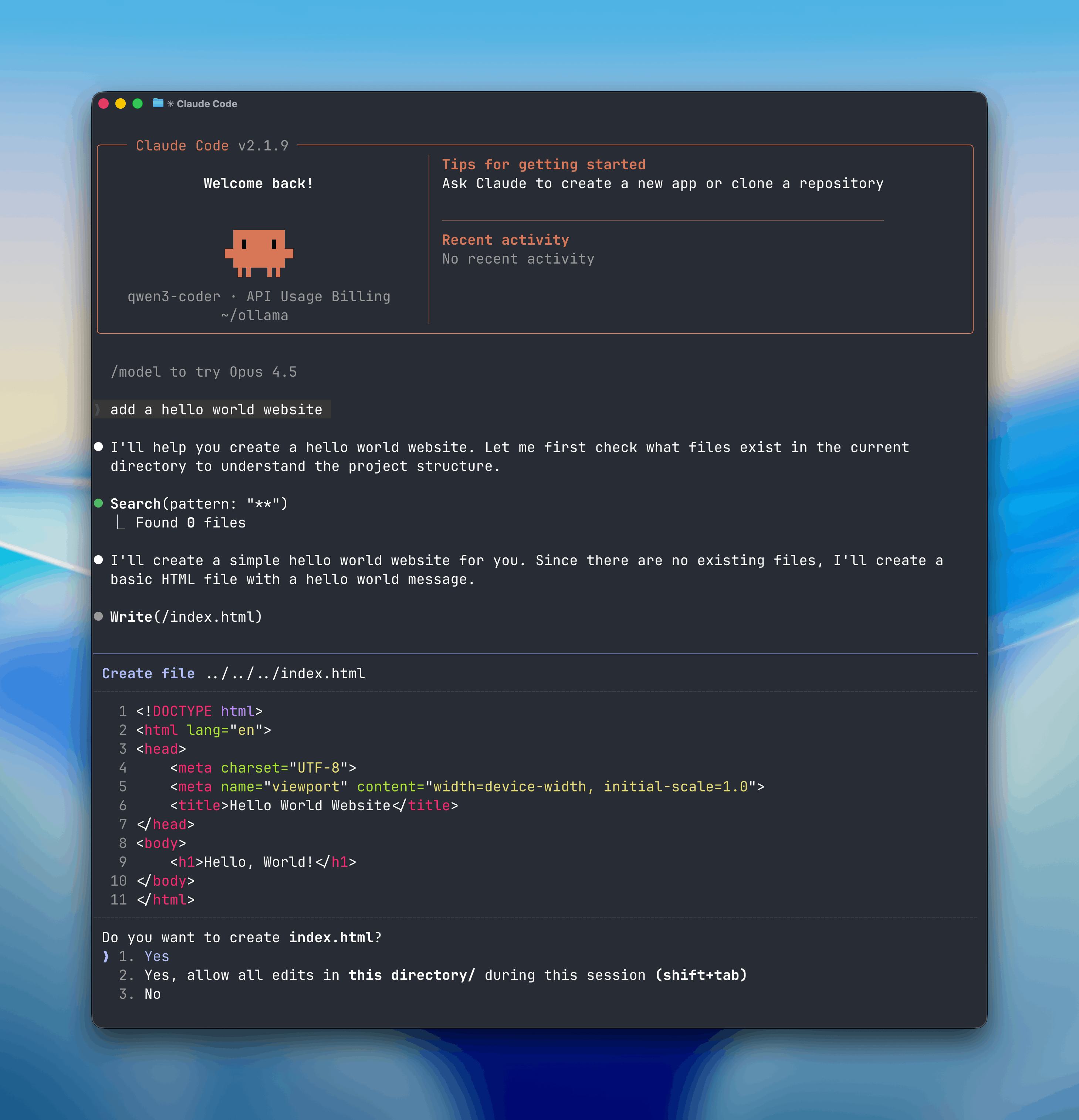
|
||||
|
||||
## Install
|
||||
|
||||
Install [Claude Code](https://code.claude.com/docs/en/overview):
|
||||
|
||||
<CodeGroup>
|
||||
|
||||
```shell macOS / Linux
|
||||
curl -fsSL https://claude.ai/install.sh | bash
|
||||
```
|
||||
|
||||
```powershell Windows
|
||||
irm https://claude.ai/install.ps1 | iex
|
||||
```
|
||||
|
||||
</CodeGroup>
|
||||
|
||||
## Usage with Ollama
|
||||
|
||||
### Quick setup
|
||||
|
||||
```shell
|
||||
ollama launch claude
|
||||
```
|
||||
|
||||
To configure without launching:
|
||||
|
||||
```shell
|
||||
ollama launch claude --config
|
||||
```
|
||||
|
||||
### Manual setup
|
||||
|
||||
Claude Code connects to Ollama using the Anthropic-compatible API.
|
||||
|
||||
1. Set the environment variables:
|
||||
|
||||
```shell
|
||||
export ANTHROPIC_AUTH_TOKEN=ollama
|
||||
export ANTHROPIC_API_KEY=""
|
||||
export ANTHROPIC_BASE_URL=http://localhost:11434
|
||||
```
|
||||
|
||||
2. Run Claude Code with an Ollama model:
|
||||
|
||||
```shell
|
||||
claude --model gpt-oss:20b
|
||||
```
|
||||
|
||||
Or run with environment variables inline:
|
||||
|
||||
```shell
|
||||
ANTHROPIC_AUTH_TOKEN=ollama ANTHROPIC_BASE_URL=http://localhost:11434 ANTHROPIC_API_KEY="" claude --model qwen3-coder
|
||||
```
|
||||
|
||||
**Note:** Claude Code requires a large context window. We recommend at least 64k tokens. See the [context length documentation](/context-length) for how to adjust context length in Ollama.
|
||||
|
||||
## Recommended Models
|
||||
|
||||
- `qwen3-coder`
|
||||
- `glm-4.7`
|
||||
- `gpt-oss:20b`
|
||||
- `gpt-oss:120b`
|
||||
|
||||
Cloud models are also available at [ollama.com/search?c=cloud](https://ollama.com/search?c=cloud).
|
||||
|
||||
@@ -13,7 +13,21 @@ npm install -g @openai/codex
|
||||
|
||||
## Usage with Ollama
|
||||
|
||||
<Note>Codex requires a larger context window. It is recommended to use a context window of at least 32K tokens.</Note>
|
||||
<Note>Codex requires a larger context window. It is recommended to use a context window of at least 64k tokens.</Note>
|
||||
|
||||
### Quick setup
|
||||
|
||||
```
|
||||
ollama launch codex
|
||||
```
|
||||
|
||||
To configure without launching:
|
||||
|
||||
```shell
|
||||
ollama launch codex --config
|
||||
```
|
||||
|
||||
### Manual setup
|
||||
|
||||
To use `codex` with Ollama, use the `--oss` flag:
|
||||
|
||||
|
||||
@@ -11,10 +11,24 @@ Install the [Droid CLI](https://factory.ai/):
|
||||
curl -fsSL https://app.factory.ai/cli | sh
|
||||
```
|
||||
|
||||
<Note>Droid requires a larger context window. It is recommended to use a context window of at least 32K tokens. See [Context length](/context-length) for more information.</Note>
|
||||
<Note>Droid requires a larger context window. It is recommended to use a context window of at least 64k tokens. See [Context length](/context-length) for more information.</Note>
|
||||
|
||||
## Usage with Ollama
|
||||
|
||||
### Quick setup
|
||||
|
||||
```bash
|
||||
ollama launch droid
|
||||
```
|
||||
|
||||
To configure without launching:
|
||||
|
||||
```shell
|
||||
ollama launch droid --config
|
||||
```
|
||||
|
||||
### Manual setup
|
||||
|
||||
Add a local configuration block to `~/.factory/config.json`:
|
||||
|
||||
```json
|
||||
@@ -73,4 +87,4 @@ Add the cloud configuration block to `~/.factory/config.json`:
|
||||
}
|
||||
```
|
||||
|
||||
Run `droid` in a new terminal to load the new settings.
|
||||
Run `droid` in a new terminal to load the new settings.
|
||||
|
||||
@@ -0,0 +1,50 @@
|
||||
---
|
||||
title: Overview
|
||||
---
|
||||
|
||||
Ollama integrates with a wide range of tools.
|
||||
|
||||
## Coding Agents
|
||||
|
||||
Coding assistants that can read, modify, and execute code in your projects.
|
||||
|
||||
- [Claude Code](/integrations/claude-code)
|
||||
- [Codex](/integrations/codex)
|
||||
- [OpenCode](/integrations/opencode)
|
||||
- [Droid](/integrations/droid)
|
||||
- [Goose](/integrations/goose)
|
||||
|
||||
## Assistants
|
||||
|
||||
AI assistants that help with everyday tasks.
|
||||
|
||||
- [OpenClaw](/integrations/openclaw)
|
||||
|
||||
## IDEs & Editors
|
||||
|
||||
Native integrations for popular development environments.
|
||||
|
||||
- [VS Code](/integrations/vscode)
|
||||
- [Cline](/integrations/cline)
|
||||
- [Roo Code](/integrations/roo-code)
|
||||
- [JetBrains](/integrations/jetbrains)
|
||||
- [Xcode](/integrations/xcode)
|
||||
- [Zed](/integrations/zed)
|
||||
|
||||
## Chat & RAG
|
||||
|
||||
Chat interfaces and retrieval-augmented generation platforms.
|
||||
|
||||
- [Onyx](/integrations/onyx)
|
||||
|
||||
## Automation
|
||||
|
||||
Workflow automation platforms with AI integration.
|
||||
|
||||
- [n8n](/integrations/n8n)
|
||||
|
||||
## Notebooks
|
||||
|
||||
Interactive computing environments with AI capabilities.
|
||||
|
||||
- [marimo](/integrations/marimo)
|
||||
@@ -0,0 +1,73 @@
|
||||
---
|
||||
title: marimo
|
||||
---
|
||||
|
||||
## Install
|
||||
|
||||
Install [marimo](https://marimo.io). You can use `pip` or `uv` for this. You
|
||||
can also use `uv` to create a sandboxed environment for marimo by running:
|
||||
|
||||
```
|
||||
uvx marimo edit --sandbox notebook.py
|
||||
```
|
||||
|
||||
## Usage with Ollama
|
||||
|
||||
1. In marimo, go to the user settings and go to the AI tab. From here
|
||||
you can find and configure Ollama as an AI provider. For local use you
|
||||
would typically point the base url to `http://localhost:11434/v1`.
|
||||
|
||||
<div style={{ display: 'flex', justifyContent: 'center' }}>
|
||||
<img
|
||||
src="/images/marimo-settings.png"
|
||||
alt="Ollama settings in marimo"
|
||||
width="50%"
|
||||
/>
|
||||
</div>
|
||||
|
||||
2. Once the AI provider is set up, you can turn on/off specific AI models you'd like to access.
|
||||
|
||||
<div style={{ display: 'flex', justifyContent: 'center' }}>
|
||||
<img
|
||||
src="/images/marimo-models.png"
|
||||
alt="Selecting an Ollama model"
|
||||
width="50%"
|
||||
/>
|
||||
</div>
|
||||
|
||||
3. You can also add a model to the list of available models by scrolling to the bottom and using the UI there.
|
||||
|
||||
<div style={{ display: 'flex', justifyContent: 'center' }}>
|
||||
<img
|
||||
src="/images/marimo-add-model.png"
|
||||
alt="Adding a new Ollama model"
|
||||
width="50%"
|
||||
/>
|
||||
</div>
|
||||
|
||||
4. Once configured, you can now use Ollama for AI chats in marimo.
|
||||
|
||||
<div style={{ display: 'flex', justifyContent: 'center' }}>
|
||||
<img
|
||||
src="/images/marimo-chat.png"
|
||||
alt="Configure code completion"
|
||||
width="50%"
|
||||
/>
|
||||
</div>
|
||||
|
||||
4. Alternatively, you can now use Ollama for **inline code completion** in marimo. This can be configured in the "AI Features" tab.
|
||||
|
||||
<div style={{ display: 'flex', justifyContent: 'center' }}>
|
||||
<img
|
||||
src="/images/marimo-code-completion.png"
|
||||
alt="Configure code completion"
|
||||
width="50%"
|
||||
/>
|
||||
</div>
|
||||
|
||||
|
||||
## Connecting to ollama.com
|
||||
|
||||
1. Sign in to ollama cloud via `ollama signin`
|
||||
2. In the ollama model settings add a model that ollama hosts, like `gpt-oss:120b`.
|
||||
3. You can now refer to this model in marimo!
|
||||
@@ -0,0 +1,63 @@
|
||||
---
|
||||
title: Onyx
|
||||
---
|
||||
|
||||
## Overview
|
||||
[Onyx](http://onyx.app/) is a self-hostable Chat UI that integrates with all Ollama models. Features include:
|
||||
- Creating custom Agents
|
||||
- Web search
|
||||
- Deep Research
|
||||
- RAG over uploaded documents and connected apps
|
||||
- Connectors to applications like Google Drive, Email, Slack, etc.
|
||||
- MCP and OpenAPI Actions support
|
||||
- Image generation
|
||||
- User/Groups management, RBAC, SSO, etc.
|
||||
|
||||
Onyx can be deployed for single users or large organizations.
|
||||
|
||||
## Install Onyx
|
||||
|
||||
Deploy Onyx with the [quickstart guide](https://docs.onyx.app/deployment/getting_started/quickstart).
|
||||
|
||||
<Info>
|
||||
Resourcing/scaling docs [here](https://docs.onyx.app/deployment/getting_started/resourcing).
|
||||
</Info>
|
||||
|
||||
## Usage with Ollama
|
||||
|
||||
1. Login to your Onyx deployment (create an account first).
|
||||
<div style={{ display: 'flex', justifyContent: 'center' }}>
|
||||
<img
|
||||
src="/images/onyx-login.png"
|
||||
alt="Onyx Login Page"
|
||||
width="75%"
|
||||
/>
|
||||
</div>
|
||||
2. In the set-up process select `Ollama` as the LLM provider.
|
||||
<div style={{ display: 'flex', justifyContent: 'center' }}>
|
||||
<img
|
||||
src="/images/onyx-ollama-llm.png"
|
||||
alt="Onyx Set Up Form"
|
||||
width="75%"
|
||||
/>
|
||||
</div>
|
||||
3. Provide your **Ollama API URL** and select your models.
|
||||
<Note>If you're running Onyx in Docker, to access your computer's local network use `http://host.docker.internal` instead of `http://127.0.0.1`.</Note>
|
||||
<div style={{ display: 'flex', justifyContent: 'center' }}>
|
||||
<img
|
||||
src="/images/onyx-ollama-form.png"
|
||||
alt="Selecting Ollama Models"
|
||||
width="75%"
|
||||
/>
|
||||
</div>
|
||||
|
||||
You can also easily connect up Onyx Cloud with the `Ollama Cloud` tab of the setup.
|
||||
|
||||
## Send your first query
|
||||
<div style={{ display: 'flex', justifyContent: 'center' }}>
|
||||
<img
|
||||
src="/images/onyx-query.png"
|
||||
alt="Onyx Query Example"
|
||||
width="75%"
|
||||
/>
|
||||
</div>
|
||||
@@ -0,0 +1,50 @@
|
||||
---
|
||||
title: OpenClaw
|
||||
---
|
||||
|
||||
OpenClaw is a personal AI assistant that runs on your own devices. It bridges messaging services (WhatsApp, Telegram, Slack, Discord, iMessage, and more) to AI coding agents through a centralized gateway.
|
||||
|
||||
## Install
|
||||
|
||||
Install [OpenClaw](https://openclaw.ai/)
|
||||
|
||||
```bash
|
||||
npm install -g openclaw@latest
|
||||
```
|
||||
|
||||
Then run the onboarding wizard:
|
||||
|
||||
```bash
|
||||
openclaw onboard --install-daemon
|
||||
```
|
||||
|
||||
<Note>OpenClaw requires a larger context window. It is recommended to use a context window of at least 64k tokens. See [Context length](/context-length) for more information.</Note>
|
||||
|
||||
## Usage with Ollama
|
||||
|
||||
### Quick setup
|
||||
|
||||
```bash
|
||||
ollama launch openclaw
|
||||
```
|
||||
|
||||
<Note>Previously known as Clawdbot. `ollama launch clawdbot` still works as an alias.</Note>
|
||||
|
||||
This configures OpenClaw to use Ollama and starts the gateway.
|
||||
If the gateway is already running, no changes need to be made as the gateway will auto-reload the changes.
|
||||
|
||||
|
||||
To configure without launching:
|
||||
|
||||
```shell
|
||||
ollama launch openclaw --config
|
||||
```
|
||||
|
||||
## Recommended Models
|
||||
|
||||
- `qwen3-coder`
|
||||
- `glm-4.7`
|
||||
- `gpt-oss:20b`
|
||||
- `gpt-oss:120b`
|
||||
|
||||
Cloud models are also available at [ollama.com/search?c=cloud](https://ollama.com/search?c=cloud).
|
||||
@@ -0,0 +1,106 @@
|
||||
---
|
||||
title: OpenCode
|
||||
---
|
||||
|
||||
OpenCode is an open-source AI coding assistant that runs in your terminal.
|
||||
|
||||
## Install
|
||||
|
||||
Install the [OpenCode CLI](https://opencode.ai):
|
||||
|
||||
```bash
|
||||
curl -fsSL https://opencode.ai/install | bash
|
||||
```
|
||||
|
||||
<Note>OpenCode requires a larger context window. It is recommended to use a context window of at least 64k tokens. See [Context length](/context-length) for more information.</Note>
|
||||
|
||||
## Usage with Ollama
|
||||
|
||||
### Quick setup
|
||||
|
||||
```bash
|
||||
ollama launch opencode
|
||||
```
|
||||
|
||||
To configure without launching:
|
||||
|
||||
```shell
|
||||
ollama launch opencode --config
|
||||
```
|
||||
|
||||
### Manual setup
|
||||
|
||||
Add a configuration block to `~/.config/opencode/opencode.json`:
|
||||
|
||||
```json
|
||||
{
|
||||
"$schema": "https://opencode.ai/config.json",
|
||||
"provider": {
|
||||
"ollama": {
|
||||
"npm": "@ai-sdk/openai-compatible",
|
||||
"name": "Ollama",
|
||||
"options": {
|
||||
"baseURL": "http://localhost:11434/v1"
|
||||
},
|
||||
"models": {
|
||||
"qwen3-coder": {
|
||||
"name": "qwen3-coder"
|
||||
}
|
||||
}
|
||||
}
|
||||
}
|
||||
}
|
||||
```
|
||||
|
||||
## Cloud Models
|
||||
|
||||
`glm-4.7:cloud` is the recommended model for use with OpenCode.
|
||||
|
||||
Add the cloud configuration to `~/.config/opencode/opencode.json`:
|
||||
|
||||
```json
|
||||
{
|
||||
"$schema": "https://opencode.ai/config.json",
|
||||
"provider": {
|
||||
"ollama": {
|
||||
"npm": "@ai-sdk/openai-compatible",
|
||||
"name": "Ollama",
|
||||
"options": {
|
||||
"baseURL": "http://localhost:11434/v1"
|
||||
},
|
||||
"models": {
|
||||
"glm-4.7:cloud": {
|
||||
"name": "glm-4.7:cloud"
|
||||
}
|
||||
}
|
||||
}
|
||||
}
|
||||
}
|
||||
```
|
||||
|
||||
## Connecting to ollama.com
|
||||
|
||||
1. Create an [API key](https://ollama.com/settings/keys) from ollama.com and export it as `OLLAMA_API_KEY`.
|
||||
2. Update `~/.config/opencode/opencode.json` to point to ollama.com:
|
||||
|
||||
```json
|
||||
{
|
||||
"$schema": "https://opencode.ai/config.json",
|
||||
"provider": {
|
||||
"ollama": {
|
||||
"npm": "@ai-sdk/openai-compatible",
|
||||
"name": "Ollama Cloud",
|
||||
"options": {
|
||||
"baseURL": "https://ollama.com/v1"
|
||||
},
|
||||
"models": {
|
||||
"glm-4.7:cloud": {
|
||||
"name": "glm-4.7:cloud"
|
||||
}
|
||||
}
|
||||
}
|
||||
}
|
||||
}
|
||||
```
|
||||
|
||||
Run `opencode` in a new terminal to load the new settings.
|
||||
@@ -20,8 +20,8 @@ curl -fsSL https://ollama.com/install.sh | sh
|
||||
Download and extract the package:
|
||||
|
||||
```shell
|
||||
curl -fsSL https://ollama.com/download/ollama-linux-amd64.tgz \
|
||||
| sudo tar zx -C /usr
|
||||
curl -fsSL https://ollama.com/download/ollama-linux-amd64.tar.zst \
|
||||
| sudo tar x -C /usr
|
||||
```
|
||||
|
||||
Start Ollama:
|
||||
@@ -41,8 +41,8 @@ ollama -v
|
||||
If you have an AMD GPU, also download and extract the additional ROCm package:
|
||||
|
||||
```shell
|
||||
curl -fsSL https://ollama.com/download/ollama-linux-amd64-rocm.tgz \
|
||||
| sudo tar zx -C /usr
|
||||
curl -fsSL https://ollama.com/download/ollama-linux-amd64-rocm.tar.zst \
|
||||
| sudo tar x -C /usr
|
||||
```
|
||||
|
||||
### ARM64 install
|
||||
@@ -50,8 +50,8 @@ curl -fsSL https://ollama.com/download/ollama-linux-amd64-rocm.tgz \
|
||||
Download and extract the ARM64-specific package:
|
||||
|
||||
```shell
|
||||
curl -fsSL https://ollama.com/download/ollama-linux-arm64.tgz \
|
||||
| sudo tar zx -C /usr
|
||||
curl -fsSL https://ollama.com/download/ollama-linux-arm64.tar.zst \
|
||||
| sudo tar x -C /usr
|
||||
```
|
||||
|
||||
### Adding Ollama as a startup service (recommended)
|
||||
@@ -146,8 +146,8 @@ curl -fsSL https://ollama.com/install.sh | sh
|
||||
Or by re-downloading Ollama:
|
||||
|
||||
```shell
|
||||
curl -fsSL https://ollama.com/download/ollama-linux-amd64.tgz \
|
||||
| sudo tar zx -C /usr
|
||||
curl -fsSL https://ollama.com/download/ollama-linux-amd64.tar.zst \
|
||||
| sudo tar x -C /usr
|
||||
```
|
||||
|
||||
## Installing specific versions
|
||||
|
||||
@@ -41,6 +41,7 @@ INSTRUCTION arguments
|
||||
| [`ADAPTER`](#adapter) | Defines the (Q)LoRA adapters to apply to the model. |
|
||||
| [`LICENSE`](#license) | Specifies the legal license. |
|
||||
| [`MESSAGE`](#message) | Specify message history. |
|
||||
| [`REQUIRES`](#requires) | Specify the minimum version of Ollama required by the model. |
|
||||
|
||||
## Examples
|
||||
|
||||
@@ -248,6 +249,16 @@ MESSAGE user Is Ontario in Canada?
|
||||
MESSAGE assistant yes
|
||||
```
|
||||
|
||||
### REQUIRES
|
||||
|
||||
The `REQUIRES` instruction allows you to specify the minimum version of Ollama required by the model.
|
||||
|
||||
```
|
||||
REQUIRES <version>
|
||||
```
|
||||
|
||||
The version should be a valid Ollama version (e.g. 0.14.0).
|
||||
|
||||
## Notes
|
||||
|
||||
- the **`Modelfile` is not case sensitive**. In the examples, uppercase instructions are used to make it easier to distinguish it from arguments.
|
||||
|
||||
@@ -596,6 +596,15 @@ components:
|
||||
name:
|
||||
type: string
|
||||
description: Model name
|
||||
model:
|
||||
type: string
|
||||
description: Model name
|
||||
remote_model:
|
||||
type: string
|
||||
description: Name of the upstream model, if the model is remote
|
||||
remote_host:
|
||||
type: string
|
||||
description: URL of the upstream Ollama host, if the model is remote
|
||||
modified_at:
|
||||
type: string
|
||||
description: Last modified timestamp in ISO 8601 format
|
||||
@@ -636,6 +645,9 @@ components:
|
||||
Ps:
|
||||
type: object
|
||||
properties:
|
||||
name:
|
||||
type: string
|
||||
description: Name of the running model
|
||||
model:
|
||||
type: string
|
||||
description: Name of the running model
|
||||
@@ -1137,6 +1149,7 @@ paths:
|
||||
example:
|
||||
models:
|
||||
- name: "gemma3"
|
||||
model: "gemma3"
|
||||
modified_at: "2025-10-03T23:34:03.409490317-07:00"
|
||||
size: 3338801804
|
||||
digest: "a2af6cc3eb7fa8be8504abaf9b04e88f17a119ec3f04a3addf55f92841195f5a"
|
||||
@@ -1168,7 +1181,8 @@ paths:
|
||||
$ref: "#/components/schemas/PsResponse"
|
||||
example:
|
||||
models:
|
||||
- model: "gemma3"
|
||||
- name: "gemma3"
|
||||
model: "gemma3"
|
||||
size: 6591830464
|
||||
digest: "a2af6cc3eb7fa8be8504abaf9b04e88f17a119ec3f04a3addf55f92841195f5a"
|
||||
details:
|
||||
|
||||
@@ -18,13 +18,13 @@ This quickstart will walk your through running your first model with Ollama. To
|
||||
<Tab title="CLI">
|
||||
Open a terminal and run the command:
|
||||
|
||||
```
|
||||
```sh
|
||||
ollama run gemma3
|
||||
```
|
||||
|
||||
</Tab>
|
||||
<Tab title="cURL">
|
||||
```
|
||||
```sh
|
||||
ollama pull gemma3
|
||||
```
|
||||
|
||||
@@ -45,13 +45,13 @@ This quickstart will walk your through running your first model with Ollama. To
|
||||
<Tab title="Python">
|
||||
Start by downloading a model:
|
||||
|
||||
```
|
||||
```sh
|
||||
ollama pull gemma3
|
||||
```
|
||||
|
||||
Then install Ollama's Python library:
|
||||
|
||||
```
|
||||
```sh
|
||||
pip install ollama
|
||||
```
|
||||
|
||||
@@ -101,3 +101,42 @@ This quickstart will walk your through running your first model with Ollama. To
|
||||
</Tabs>
|
||||
|
||||
See a full list of available models [here](https://ollama.com/models).
|
||||
|
||||
## Coding
|
||||
|
||||
For coding use cases, we recommend using the `glm-4.7-flash` model.
|
||||
|
||||
Note: this model requires 23 GB of VRAM with 64000 tokens context length.
|
||||
```sh
|
||||
ollama pull glm-4.7-flash
|
||||
```
|
||||
|
||||
Alternatively, you can use a more powerful cloud model (with full context length):
|
||||
```sh
|
||||
ollama pull glm-4.7:cloud
|
||||
```
|
||||
|
||||
Use `ollama launch` to quickly set up a coding tool with Ollama models:
|
||||
|
||||
```sh
|
||||
ollama launch
|
||||
```
|
||||
|
||||
### Supported integrations
|
||||
|
||||
- [OpenCode](/integrations/opencode) - Open-source coding assistant
|
||||
- [Claude Code](/integrations/claude-code) - Anthropic's agentic coding tool
|
||||
- [Codex](/integrations/codex) - OpenAI's coding assistant
|
||||
- [Droid](/integrations/droid) - Factory's AI coding agent
|
||||
|
||||
### Launch with a specific model
|
||||
|
||||
```sh
|
||||
ollama launch claude --model glm-4.7-flash
|
||||
```
|
||||
|
||||
### Configure without launching
|
||||
|
||||
```sh
|
||||
ollama launch claude --config
|
||||
```
|
||||
|
||||
@@ -0,0 +1,46 @@
|
||||
# extract-examples
|
||||
|
||||
Extracts code examples from MDX files to a temp directory so you can run them.
|
||||
|
||||
## Usage
|
||||
|
||||
```shell
|
||||
go run docs/tools/extract-examples/main.go <mdx-file>
|
||||
```
|
||||
|
||||
## Example
|
||||
|
||||
```shell
|
||||
go run docs/tools/extract-examples/main.go docs/api/openai-compatibility.mdx
|
||||
```
|
||||
|
||||
Output:
|
||||
|
||||
```
|
||||
Extracting code examples to: /var/folders/vq/wfm2g6k917d3ldzpjdxc8ph00000gn/T/mdx-examples-3271754368
|
||||
|
||||
- 01_basic.py
|
||||
- 01_basic.js
|
||||
- 01_basic.sh
|
||||
- 02_responses.py
|
||||
- 02_responses.js
|
||||
- 02_responses.sh
|
||||
- 03_vision.py
|
||||
- 03_vision.js
|
||||
- 03_vision.sh
|
||||
|
||||
Extracted 9 file(s) to /var/folders/vq/wfm2g6k917d3ldzpjdxc8ph00000gn/T/mdx-examples-3271754368
|
||||
|
||||
To run examples:
|
||||
|
||||
cd /var/folders/vq/wfm2g6k917d3ldzpjdxc8ph00000gn/T/mdx-examples-3271754368
|
||||
npm install # for JS examples
|
||||
|
||||
then run individual files with `node file.js`, `python file.py`, `bash file.sh`
|
||||
```
|
||||
|
||||
## How it works
|
||||
|
||||
- Parses MDX files looking for fenced code blocks with filenames (e.g., ` ```python basic.py `)
|
||||
- Groups examples by their `<CodeGroup>` and prefixes filenames with `01_`, `02_`, etc.
|
||||
- Writes all extracted files to a temp directory
|
||||
@@ -0,0 +1,137 @@
|
||||
package main
|
||||
|
||||
import (
|
||||
"bufio"
|
||||
"fmt"
|
||||
"os"
|
||||
"path/filepath"
|
||||
"regexp"
|
||||
"strings"
|
||||
)
|
||||
|
||||
func main() {
|
||||
if len(os.Args) < 2 {
|
||||
fmt.Fprintln(os.Stderr, "Usage: go run extract-examples.go <mdx-file>")
|
||||
os.Exit(1)
|
||||
}
|
||||
|
||||
mdxFile := os.Args[1]
|
||||
|
||||
f, err := os.Open(mdxFile)
|
||||
if err != nil {
|
||||
fmt.Fprintf(os.Stderr, "Error: %v\n", err)
|
||||
os.Exit(1)
|
||||
}
|
||||
defer f.Close()
|
||||
|
||||
// Create temp directory
|
||||
tempDir, err := os.MkdirTemp("", "mdx-examples-*")
|
||||
if err != nil {
|
||||
fmt.Fprintf(os.Stderr, "Error creating temp dir: %v\n", err)
|
||||
os.Exit(1)
|
||||
}
|
||||
|
||||
fmt.Printf("Extracting code examples to: %s\n\n", tempDir)
|
||||
|
||||
// Patterns
|
||||
codeBlockStart := regexp.MustCompile("^```([a-zA-Z0-9_-]+)\\s+([^\\s]+)$")
|
||||
codeGroupStart := regexp.MustCompile("^<CodeGroup")
|
||||
codeGroupEnd := regexp.MustCompile("^</CodeGroup>")
|
||||
|
||||
scanner := bufio.NewScanner(f)
|
||||
inCodeBlock := false
|
||||
inCodeGroup := false
|
||||
var currentFile string
|
||||
var content strings.Builder
|
||||
count := 0
|
||||
codeGroupNum := 0
|
||||
|
||||
for scanner.Scan() {
|
||||
line := scanner.Text()
|
||||
|
||||
// Track CodeGroup boundaries
|
||||
if codeGroupStart.MatchString(line) {
|
||||
inCodeGroup = true
|
||||
codeGroupNum++
|
||||
continue
|
||||
}
|
||||
if codeGroupEnd.MatchString(line) {
|
||||
inCodeGroup = false
|
||||
continue
|
||||
}
|
||||
|
||||
if inCodeBlock {
|
||||
if line == "```" {
|
||||
// End of code block - write file
|
||||
if currentFile != "" {
|
||||
outPath := filepath.Join(tempDir, currentFile)
|
||||
if err := os.WriteFile(outPath, []byte(content.String()), 0o644); err != nil {
|
||||
fmt.Fprintf(os.Stderr, "Error writing %s: %v\n", currentFile, err)
|
||||
} else {
|
||||
fmt.Printf(" - %s\n", currentFile)
|
||||
count++
|
||||
}
|
||||
}
|
||||
inCodeBlock = false
|
||||
currentFile = ""
|
||||
content.Reset()
|
||||
} else {
|
||||
content.WriteString(line)
|
||||
content.WriteString("\n")
|
||||
}
|
||||
} else {
|
||||
if matches := codeBlockStart.FindStringSubmatch(line); matches != nil {
|
||||
inCodeBlock = true
|
||||
filename := matches[2]
|
||||
// Prefix with CodeGroup number if inside a CodeGroup
|
||||
if inCodeGroup {
|
||||
currentFile = fmt.Sprintf("%02d_%s", codeGroupNum, filename)
|
||||
} else {
|
||||
currentFile = filename
|
||||
}
|
||||
content.Reset()
|
||||
}
|
||||
}
|
||||
}
|
||||
|
||||
if err := scanner.Err(); err != nil {
|
||||
fmt.Fprintf(os.Stderr, "Error reading file: %v\n", err)
|
||||
os.Exit(1)
|
||||
}
|
||||
|
||||
// Write package.json for JavaScript dependencies
|
||||
packageJSON := `{
|
||||
"name": "mdx-examples",
|
||||
"type": "module",
|
||||
"dependencies": {
|
||||
"openai": "^4",
|
||||
"ollama": "^0.5"
|
||||
}
|
||||
}
|
||||
`
|
||||
if err := os.WriteFile(filepath.Join(tempDir, "package.json"), []byte(packageJSON), 0o644); err != nil {
|
||||
fmt.Fprintf(os.Stderr, "Error writing package.json: %v\n", err)
|
||||
}
|
||||
|
||||
// Write pyproject.toml for Python dependencies
|
||||
pyprojectTOML := `[project]
|
||||
name = "mdx-examples"
|
||||
version = "0.0.0"
|
||||
dependencies = [
|
||||
"openai",
|
||||
"ollama",
|
||||
]
|
||||
`
|
||||
if err := os.WriteFile(filepath.Join(tempDir, "pyproject.toml"), []byte(pyprojectTOML), 0o644); err != nil {
|
||||
fmt.Fprintf(os.Stderr, "Error writing pyproject.toml: %v\n", err)
|
||||
}
|
||||
|
||||
fmt.Printf("\n")
|
||||
fmt.Printf("Extracted %d file(s) to %s\n", count, tempDir)
|
||||
fmt.Printf("\n")
|
||||
fmt.Printf("To run examples:\n")
|
||||
fmt.Printf("\n")
|
||||
fmt.Printf(" cd %s\n npm install # for JS examples\n", tempDir)
|
||||
fmt.Printf("\n")
|
||||
fmt.Printf("then run individual files with `node file.js`, `python file.py`, `bash file.sh`\n")
|
||||
}
|
||||
@@ -1,3 +0,0 @@
|
||||
# Troubleshooting
|
||||
|
||||
For troubleshooting, see [https://docs.ollama.com/troubleshooting](https://docs.ollama.com/troubleshooting)
|
||||
@@ -87,7 +87,7 @@ When Ollama starts up, it takes inventory of the GPUs present in the system to d
|
||||
|
||||
### Linux NVIDIA Troubleshooting
|
||||
|
||||
If you are using a container to run Ollama, make sure you've set up the container runtime first as described in [docker.md](./docker.md)
|
||||
If you are using a container to run Ollama, make sure you've set up the container runtime first as described in [docker](./docker)
|
||||
|
||||
Sometimes the Ollama can have difficulties initializing the GPU. When you check the server logs, this can show up as various error codes, such as "3" (not initialized), "46" (device unavailable), "100" (no device), "999" (unknown), or others. The following troubleshooting techniques may help resolve the problem
|
||||
|
||||
|
||||